
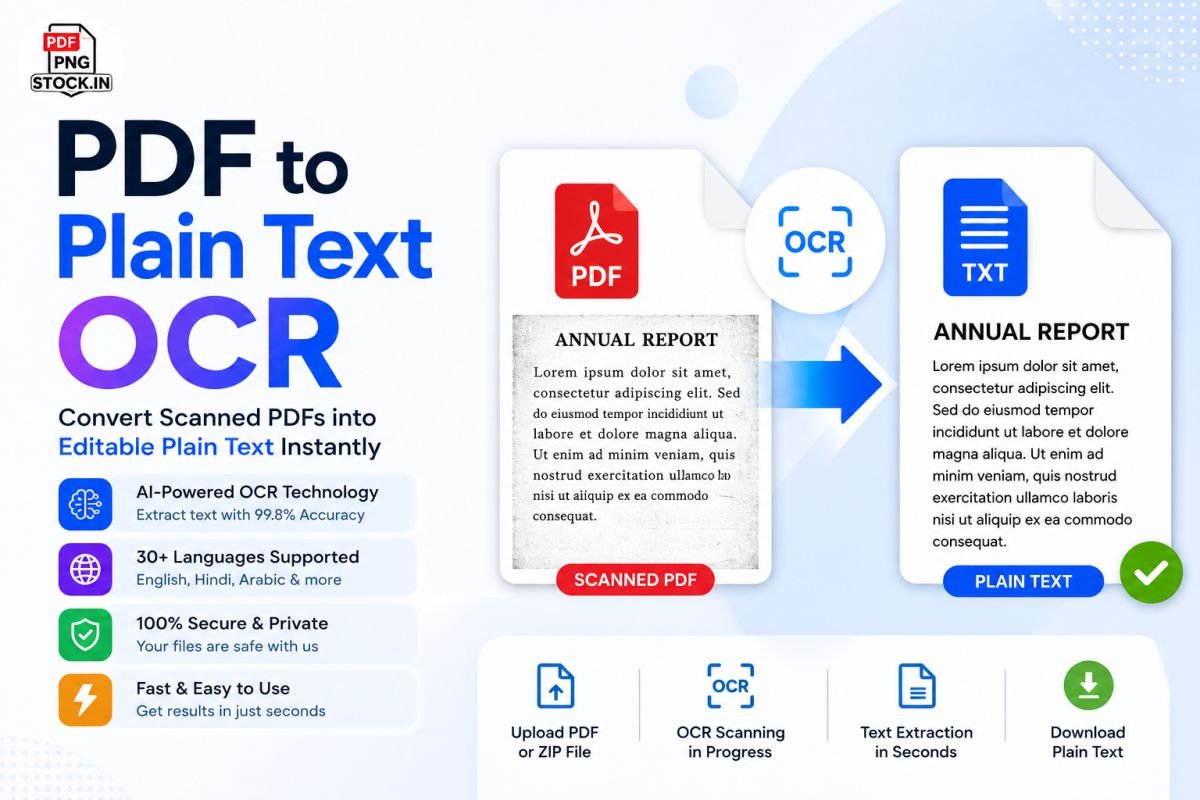
Have you ever downloaded a PDF only to discover that you can’t copy, search, or edit the text inside it? This usually happens when the PDF is actually a scanned image rather than a text-based document.
The PDF to Plain Text OCR Tool from PNGStock solves this problem by using advanced Optical Character Recognition (OCR) technology to extract text from scanned PDFs and convert it into clean, editable plain text within seconds.
Whether you're a student, business professional, researcher, government employee, or content creator, this tool helps transform image-based PDFs into searchable and editable text without installing any software.
What is PDF to Plain Text OCR?
PDF to Plain Text OCR is an online conversion tool that scans PDF documents, recognizes text within images, and converts it into editable plain text (.txt format).
Unlike traditional PDF text extraction tools that only work with selectable PDFs, OCR technology can read:
-
Scanned documents
-
Printed books
-
Receipts
-
Invoices
-
Forms
-
Handwritten notes (basic recognition)
-
Image-based PDFs
The extracted content can then be copied, edited, translated, summarized, or reused anywhere.
Key Features
AI-Powered OCR Engine
Our advanced OCR technology accurately recognizes text from scanned documents and image-based PDFs.
High Accuracy Recognition
With up to 99.8% OCR accuracy, the tool captures text while preserving readability and formatting as closely as possible.
Supports Multiple Languages
Extract text from documents written in:
-
English
-
Hindi
-
Urdu
-
Arabic
-
French
-
German
-
Spanish
-
Italian
-
Portuguese
-
And 30+ other languages
Secure Processing
Your files remain private and secure throughout the conversion process.
Fast Cloud-Based Conversion
No software installation required. Upload your PDF and get editable text in seconds.
Bulk OCR Support
Upload ZIP archives containing multiple PDF files for batch text extraction.
Browser-Based Tool
Works perfectly on:
-
Windows
-
macOS
-
Linux
-
Android
-
iPhone
-
Tablets
Why Convert PDF to Plain Text?
Easy Editing
Plain text files can be edited in any text editor without needing PDF software.
Better Searchability
Search, analyze, and process extracted content more efficiently.
Content Reuse
Reuse information for:
-
Reports
-
Research papers
-
Blogs
-
Documentation
-
Data entry
Translation
Convert scanned PDFs into editable text before translating them into other languages.
AI & Automation Ready
Use extracted text with:
-
ChatGPT
-
AI tools
-
Data processing software
-
Machine learning applications
How to Use the PDF to Plain Text OCR Tool
Step 1: Upload Your File
Drag and drop your PDF document or click Choose File.
Step 2: Select OCR Language
Choose the primary language used in your document for better accuracy.
Step 3: Start OCR Extraction
Click Extract Text & Run OCR.
Step 4: Review Results
The OCR engine scans each page and extracts the text.
Step 5: Download Text File
Save the extracted content as an editable plain text file.
Common Use Cases
Students
Convert scanned study material into editable notes.
Researchers
Extract information from archived documents and journals.
Businesses
Digitize invoices, contracts, and records.
Government Offices
Convert paper archives into searchable digital content.
Publishers
Extract text from old books and magazines.
Legal Professionals
Digitize legal documents and court records.
Supported Documents
The OCR engine works effectively with:
-
Scanned PDFs
-
Image PDFs
-
Books
-
Magazines
-
Contracts
-
Invoices
-
Reports
-
Receipts
-
Certificates
-
Forms
-
Academic Papers
Tips for Best OCR Results
To achieve maximum accuracy:
-
Upload high-resolution PDFs.
-
Ensure text is clearly visible.
-
Avoid heavily blurred scans.
-
Select the correct document language.
-
Use properly aligned pages.
-
Prefer black text on a light background.
Benefits of Using PNGStock PDF OCR Tool
No Registration Required
Start converting instantly.
Free and Fast
Process documents quickly without complicated setup.
Cloud Processing
No heavy software installation.
Mobile Friendly
Use OCR from anywhere on any device.
Accurate Text Recognition
Built for professional document conversion.
Privacy Focused
Files are processed securely and removed automatically after processing.
Frequently Asked Questions
Can OCR extract text from scanned PDFs?
Yes. OCR technology is specifically designed to recognize text within scanned images and PDFs.
Does the tool support multiple languages?
Yes. The OCR engine supports more than 30 languages.
Is my uploaded document secure?
Yes. Files are processed securely and automatically removed after conversion.
Can I use the extracted text in Word or Google Docs?
Absolutely. The plain text output can be pasted into any editor or document application.
Does OCR work on old documents?
Yes, although recognition quality depends on the scan quality and document condition.
Conclusion
If you regularly work with scanned documents, image-based PDFs, books, invoices, or archived records, the PDF to Plain Text OCR Tool is an essential productivity solution. It transforms non-editable PDFs into clean, searchable, and editable text using advanced AI-powered OCR technology.
Upload your PDF, run OCR, and convert scanned content into usable text in just a few clicks.


Reader Discussions
No comments posted yet. Be the first to start the discussion!
Leave a Reply